
Press ReleaseJune 20, 2026
Introducing eRegs v2: A Complete Rebuild of Your FMCSR Compliance Platform
eRegs v2 is here! We rebuilt the entire platform from the ground up. Every change in v2 was driven by feedback from the safety professionals, fleet managers, and compliance officers who use eRegs every day. You told us what was working, what wasn't, and what you needed. We listened.
Here's what's new, and more importantly, why.
TL;DR: Top 5 Updates
- Redesigned three-panel reader. Table of Contents, regulation text, and expert insights side by side, all collapsible and resizable.
- Full-text search. Find any regulation, guidance, or content instantly instead of scrolling through hundreds of pages.
- Version history and change tracking. See exactly what changed in any regulation section with color-coded diffs and point-in-time views.
- Hazardous Materials Regulations. 49 CFR Parts 171-180 with PHMSA Letters of Interpretation, available as an add-on.
- No more native apps. eRegs is now a Progressive Web App that installs from your browser, works offline, and always stays up to date.
FUNCTIONAL CHANGES
These are the changes to what eRegs does: the tools, content, and capabilities that help you do your job better.
A Completely Redesigned Reading Experience
Why this change? We heard from our users that navigating regulations without an easy-to-review table of contents was challenging. Finding the right section meant scrolling endlessly, and there was no way to see related guidance without leaving the page. The old interface made a hard job harder.
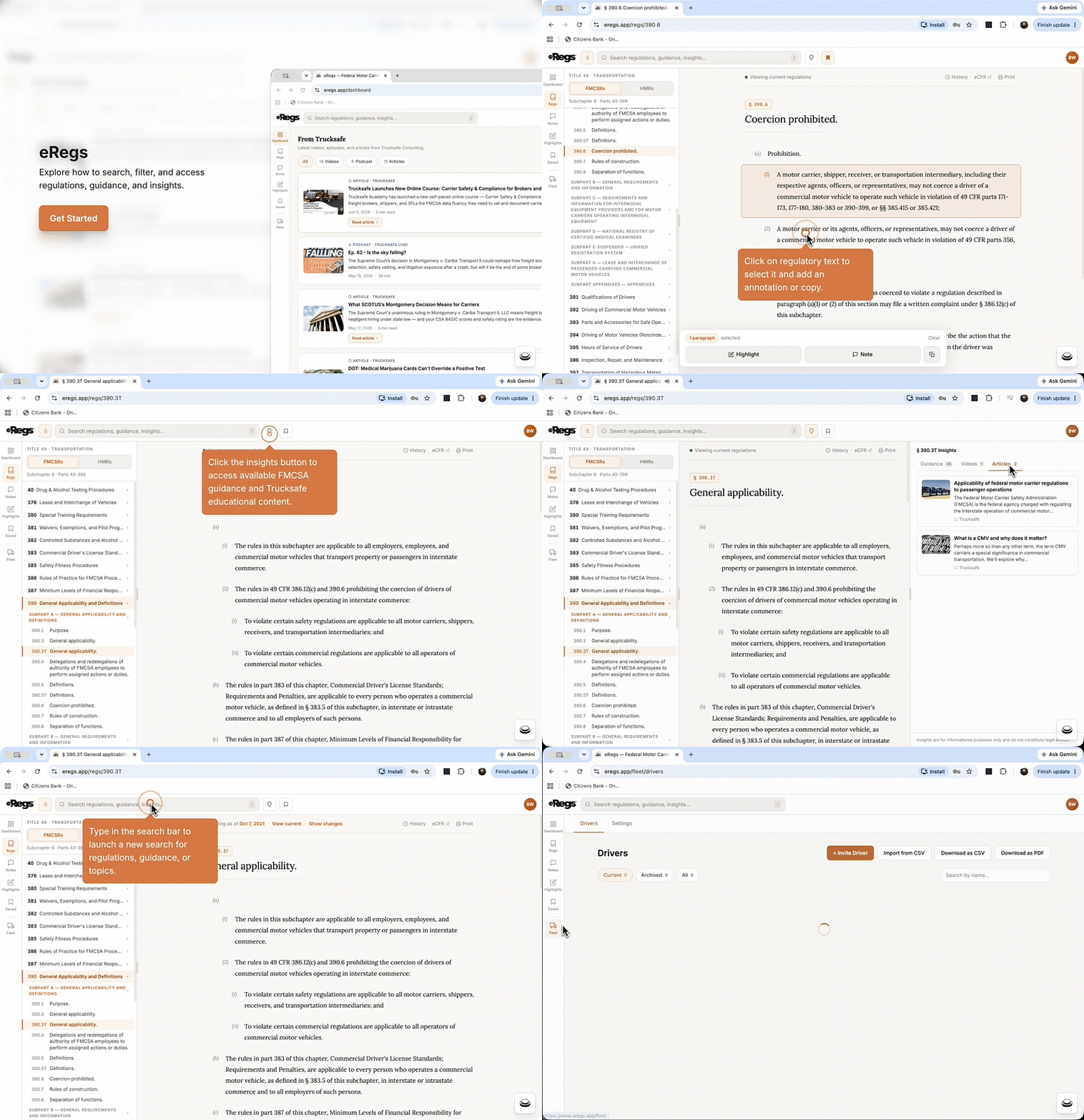
eRegs v2 is built around a three-panel layout designed to feel like thumbing through a book:
- Table of Contents (left panel): Now you have a complete, expandable view of regulatory Parts, Sub-Parts, and Sections right alongside the regulation text. Expand and collapse to drill into exactly what you need. Jump to any section with a single click. You always know where you are in the regulation structure.
- Regulation Reader (center panel): Clean, readable text with proper formatting of tables, figures, and diagrams. This is where you spend your time, and the interface is designed to stay out of your way. Inline annotation tools let you highlight, note, and bookmark without switching screens.
- Insights (right panel): FMCSA guidance, Trucksafe videos, and articles that are relevant to whatever section you're reading, surfaced automatically. No more searching separately for interpretations or training content. The guidance comes to you.
Each panel collapses independently, so you can focus on just the text when that's all you need, or open everything up when you're doing deep research. Your layout preferences are saved automatically. eRegs remembers your setup between sessions.
On mobile, the layout adapts automatically. The TOC becomes a slide-out menu, and the reader takes the full screen. The result is a reading experience that works the way you do, whether you're at a desk with a wide monitor, reviewing regulations on a tablet in the shop, or checking a section from your phone in the field.
Full-Text Search
Why this change? Users told us they were spending too much time hunting for specific sections, guidance, educational content, or trying to remember where they read something. Scrolling through hundreds of pages of regulation text to find one clause is frustrating and unproductive.
eRegs v2 includes instant search across all regulation text, FMCSA guidance, PHMSA interpretations, and Trucksafe educational content:
- Type a keyword, phrase, or section number (e.g., "390.5" or "hours of service") and get results in milliseconds
- Use boolean operators (e.g., AND, OR, BUT) to narrow results when you know exactly what you're looking for
- Results are categorized by type (regulations, guidance, videos, articles) so you can filter to what matters
- Fleet drivers can search regulation text directly from their devices
No more flipping through pages. Type what you need, find it instantly, and get back to work.
Version History and Change Tracking
Why this change? This was one of the most requested features from our users. When regulations change, safety professionals need to know exactly what changed, when it changed, and what the text looked like before. Without that visibility, you're left wondering whether your policies, training, or procedures are still aligned with current requirements.
eRegs v2 now maintains a complete version history for every regulation section:
- Point-in-time views. Select any date and see the regulation text exactly as it appeared on that day. This is invaluable during audits, investigations, or when you need to verify what was in effect at a specific moment.
- Color-coded inline diffs. Additions show in green, deletions in red, and modifications in yellow. No guessing, no comparing PDFs side by side.
- Activity & Changes feed. A dedicated page showing a running timeline of all regulation amendments across every covered part. Your at-a-glance view of what's been amended recently.
Regulation Change Notifications
Why this change? Regulation amendments can slip by unnoticed if you're not checking the Federal Register daily. Our users told us they wanted to be proactively alerted, not find out weeks later that a section they rely on has been updated.
When a regulation section you've annotated (highlighted, noted, or bookmarked) is amended, eRegs now notifies you automatically via push notifications to your browser or installed app. You can configure which categories of notifications you receive from your account settings: regulation changes, new content, or announcements.
You stay informed without having to check. The regulations come to you.
Hazardous Materials Regulations (HMR)
Why this change? Carriers handling hazmat have the same need for accessible, annotatable regulation text, but until now eRegs only covered FMCSR. If you're hauling hazmat, you need Parts 171-180 just as much as you need Parts 390-399.
eRegs v2 now covers 49 CFR Parts 171 through 180, the Hazardous Materials Regulations, as an add-on. You get the same reading experience: annotations, search, version history, and insights. We've also imported hundreds of PHMSA Letters of Interpretation that surface inline as you read, just like FMCSA guidance does for FMCSR.
The Hazmat add-on is available for $5/month or $50/year on any plan.
Enterprise Accounts
Why this change? Larger fleets with multiple terminals and regional safety managers told us they needed more structure. A single fleet manager login doesn't scale when you have safety leads across the country who each need to manage their own drivers.
eRegs v2 introduces Enterprise accounts:
- Multiple manager seats. Give each terminal or regional safety manager their own login and access to the company’s account.
- Driver groups. Organize drivers by terminal, region, or team.
- Volume pricing. Discounted rates for driver invites at scale.
Enterprise accounts are set up directly with our team. Contact us for details.
Passwordless Driver Access
Why this change? In the old eRegs, drivers needed a username and password. That meant fleet managers were fielding "I forgot my password" calls, drivers were locked out of regulations they needed, and IT teams were managing credentials for people who just needed to read and acknowledge.
In v2, drivers never need credentials at all. eRegs uses secure invite links and device-based authentication:
- Fleet manager invites a driver by name and email
- Driver receives an email with a one-tap link
- Driver acknowledges the regulations and their device is authorized automatically
- Driver accesses the regulation reader from that device without ever logging in again
- On shared tablets, drivers simply select their name from a list
The result: zero friction for drivers, fewer support calls for fleet managers, and a more secure system. Device tokens can't be phished or shared like passwords.
Bulk Driver Management
Why this change? Fleet managers with dozens or hundreds of drivers told us that managing them one at a time was too slow. Inviting, archiving, and downloading receipts needed to work at scale.
Fleet managers can now:
- Bulk import drivers via CSV. Upload a file with names and emails, and all invites go out at once.
- Multi-select actions. Archive, remove, or assign drivers to groups in bulk.
- Download acknowledgement receipts as a ZIP file for an entire group or selection.
Managing large driver rosters is now minutes, not hours.
Tablet Mode for Shared Devices
Why this change? Many fleets use shared tablets in the cab, but the old app wasn't designed for multiple drivers on one device. Logging in and out between drivers was clunky and time-consuming, especially in slip-seat operations.
eRegs v2 includes a dedicated Tablet Mode:
- Register tablets in Fleet Settings with unit numbers
- Assign drivers to specific tablets
- One-tap driver switching. The next driver selects their name from a list. No passwords, no logging out.
Purpose-built for the realities of shared equipment and multiple drivers per vehicle.
Improved Regulation Tables
Why this change? Regulation tables (common in Parts 393, 395, and 396) were hard to read on smaller screens. Users were pinching and scrolling sideways without knowing if there was more content off-screen.
Tables now include horizontal scroll hints so you always know when content extends beyond the screen, and a full-screen expand option that lets you view any table in a dedicated modal. Much easier on phones and tablets.
APP AND PLATFORM CHANGES
These are changes to how eRegs works as an application: how you access it, install it, and get help.
Better Visibility for Fleet Managers
Fleet Administrators now have complete visibility into their accounts with a comprehensive management dashboard. From a single interface, administrators can monitor account details, track billing activity, and manage subscription settings with ease. This centralized view eliminates the need to navigate multiple screens, giving fleet managers the control and clarity they need to keep operations running smoothly and costs in check.
The Native Apps Are Retiring
Why this change? The old iOS and Android apps were limited by app store constraints. Updates took days or weeks to roll out. Bug fixes sat in review queues. And maintaining two native apps plus the web version meant features shipped slower across the board.
eRegs v2 is a Progressive Web App (PWA) that replaces the native apps entirely. The existing apps in the Apple App Store and Google Play Store will be removed after launch day.
Why the PWA is better for you:
- Always up to date. Every time you open eRegs, you have the latest version. No app store updates to install, no waiting for review approvals.
- Works offline. Download any regulation part for reading without an internet connection. Critical for drivers in areas with unreliable cell service.
- Push notifications. Get alerts for regulation changes, new content, and announcements, just like the native app did.
- Installs in seconds. Add eRegs to your home screen directly from your browser. No app store, no downloads, no storage-heavy installs.
- Works everywhere. iPhone, Android, tablets, laptops, desktops. One app, every device.
How to install:
- Open eregs.app in your browser and log in (Safari on iPhone, Chrome on Android)
- Tap the Share button (iPhone) or the three-dot menu (Android)
- Tap "Add to Home Screen"
- Delete the old eRegs app from your device
Automatic Driver Migration
Why this change? We didn't want fleet managers to have to re-invite every driver or coordinate a manual transition. That would mean more work for you and confusion for your drivers.
When v2 launched, every existing driver in the system automatically received a "Welcome to eRegs v2" email with a personal invite link:
- Driver receives their email with a unique link
- Driver taps the link and acknowledges the regulations on the new platform
- Driver's device is automatically authorized, with no login or password needed
- Driver can install eRegs on their home screen and delete the old app
No re-inviting. No additional invite charges. No fleet manager action needed. All existing acknowledgement records and DQ file receipts are preserved and visible in the fleet dashboard from day one.
For fleets that want to give drivers a heads-up, here's an optional message:
You'll be getting an email from eRegs soon with a link to set up your account on the new version. Just tap the link, acknowledge the regulations, and you're in. No password needed. The old eRegs app from the App Store / Play Store is being replaced, so you can delete it once you're set up on the new one.
Dark Mode
Why this change? This was one of our most requested features. Safety professionals reviewing regulations late at night or in low-light environments like truck cabs or offices after hours wanted an option that's easier on the eyes.
Dark mode is now available across the entire app: reader, annotations, search, insights, fleet dashboard, and all other pages. Toggle it on from your account settings. Your preference is saved and persists across sessions, with carefully tuned colors for readability.
Help Center and Knowledge Base
Why this change? Users told us they wanted self-service help without having to send an email and wait for a response. Whether it's figuring out how to use a feature or troubleshooting an issue, you shouldn't have to wait.
eRegs now includes a built-in Help Center with 26 articles organized across 6 categories: Getting Started, Fleet Management, Account & Billing, Reading & Annotations, Hazmat Regulations, and Support. It's searchable and accessible from anywhere in the app.
In-App Support Tickets
Why this change? When you do need direct help, switching to email and describing your issue without context is inefficient. Now you can submit a support ticket directly from inside eRegs. Attach screenshots, describe your issue, and track the status of your request without leaving the app.
What Stays the Same (Existing Users)
- Your login. Same email and password.
- Your data. All annotations, driver records, and acknowledgement receipts are preserved.
- Your billing. Existing subscriptions continue at current rates.
- The regulations. Still sourced directly from eCFR.gov, still updated automatically.
Ready to See It for Yourself?
eRegs v2 is live now. If you're an existing user, your account is already here. Just log in with your current email and password, and everything is waiting for you.
New to eRegs? There's never been a better time to start. Begin your free 14-day trial at eregs.app. No credit card required. See why fleet safety professionals across the U.S. trust eRegs to keep their fleets compliant.
And this is just the beginning.
The eRegs team is hard at work on exciting updates coming in the near future, including AI-powered tools to streamline safety managers' workflows, integrations with leading ELD partners, collaboration and sharing features for regulations, and enhanced compliance tools to make staying current easier than ever. The best of eRegs is still ahead.
Have questions? Our Help Center is at eregs.app/help, or reach us directly eregs.app.contact. We're here to help you get the most out of the new platform.
Start your free trial today at eregs.app.