Regulations change. eRegs helps you know exactly when, what, and how the text has been updated — and whether your annotations are affected.
Version history timeline
While viewing any regulation section, tap the clock icon in the top navigation bar to open the version history panel. You will see a vertical timeline with color-coded dots:
- Red dot — a substantive amendment (the legal meaning changed).
- Gray dot — an editorial correction (formatting, typos, renumbering with no legal effect).
- Orange dot — a pending amendment that has been published in the Federal Register but is not yet effective.
Show Changes (diff view)
- In the version history timeline, select a date.
- Tap the Show changes button.
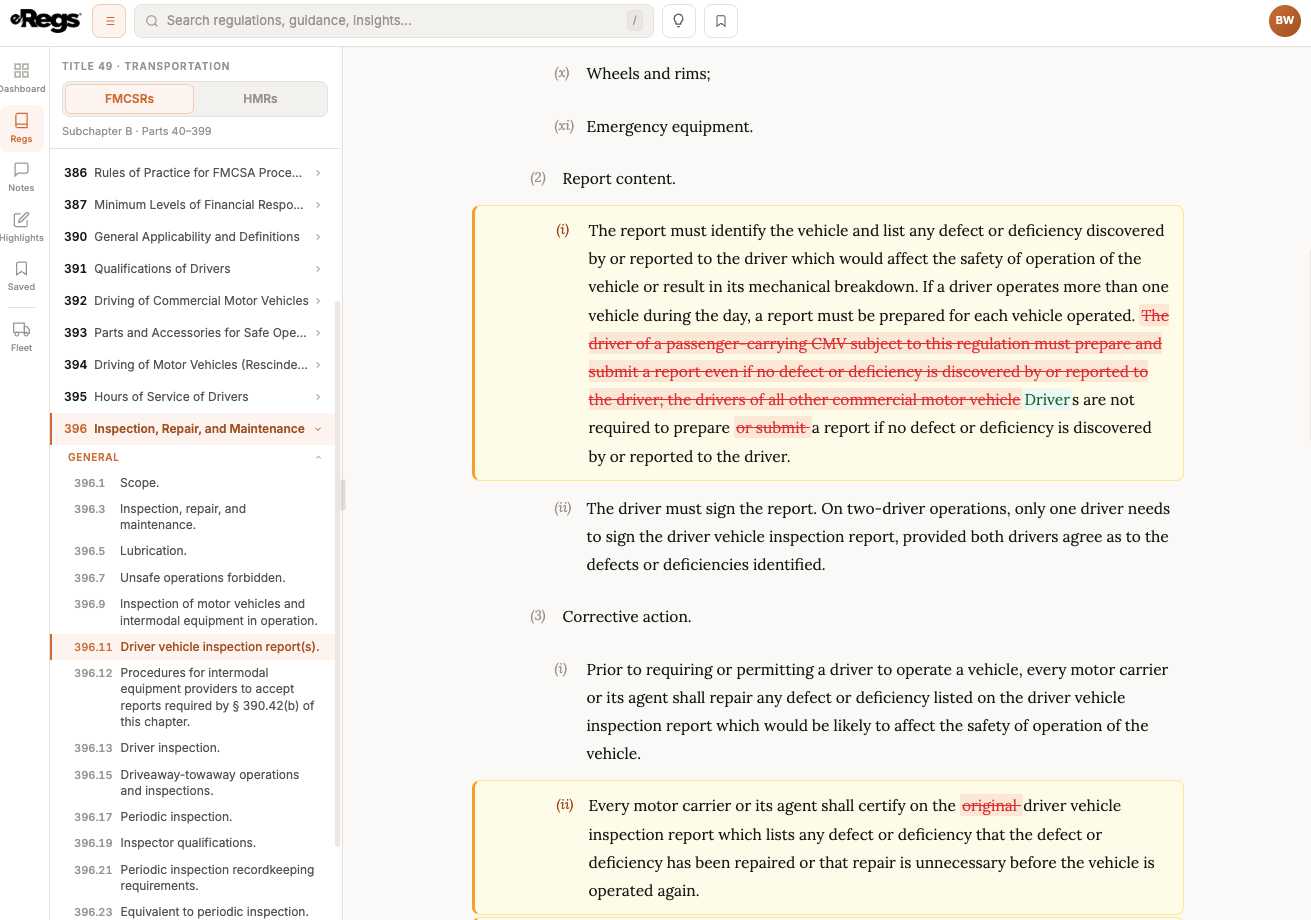
- The regulation text switches to a diff view:
- Green highlighting — text that was added.
- Red strikethrough — text that was removed.
- Amber highlighting — text that was modified, with word-level detail so you can see exactly which words changed.
Pending amendments
When a final rule has been published but its effective date has not arrived, the timeline shows an orange dot with the future effective date and a link to the Federal Register notice. This lets you prepare before the change takes effect.
Activity & Changes page
Your dashboard includes an Activity & Changes page that provides a 12-month view of all regulation changes across every part. Sections where you have annotations are flagged with YOUR ANNOTATIONS badges so you can focus on the changes that matter to you.
How regulation updates affect your annotations
When eRegs detects that a section you have annotated was amended, it categorizes the impact:
- Auto-fixed (green) — a minor change that eRegs resolved automatically (e.g., paragraph renumbering). No action needed.
- Text changed (amber) — the paragraph text was modified. Review the new wording to make sure your note or highlight still applies.
- Displaced (red) — the paragraph was removed or restructured. Your annotation may no longer line up.
A review panel lets you accept, keep, or delete each affected annotation after reading the changes.
How eRegs stays current
eRegs syncs with the Electronic Code of Federal Regulations (eCFR.gov) every day. Amendments appear as soon as they are incorporated into the eCFR, typically within one to two business days of the effective date.